
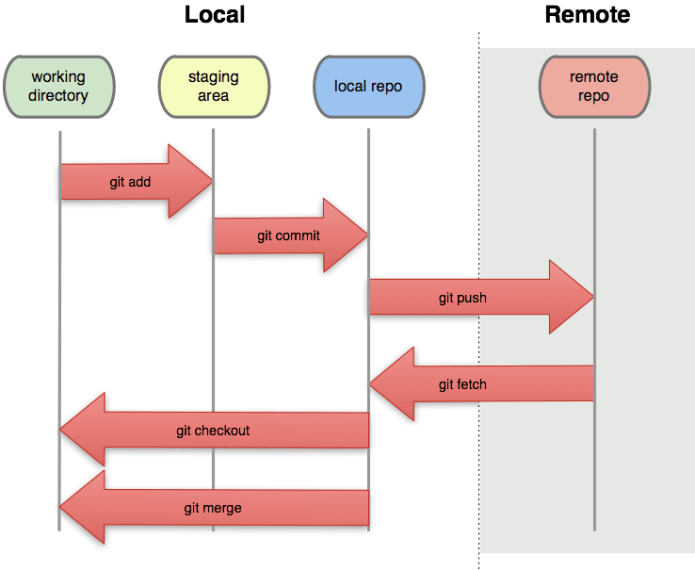
 After the first post on Git 101, here is a set of commands you will use after the first 15-20 minutes of working with it. Some are very useful (e.g. stash your work before you can commit it in order to go for a quick coffee when your code is not done) and some are a quite rare (e.g. setting up a git on a remote server). Good luck.
Update & Merge
Creating a branch (and switching to the new branch) in one line
git checkout -b "The new branch name"
- git pull – to update your local repository to the newest commit. It will fetch and merge remote changes.
- git merge – to merge another branch into your active branch (e.g. master).
Remember that in both cases, git tries to auto-merge changes. IF you have conflicts, You are responsible to merge those conflicts manually by editing the files shown by git. After changing, you need to mark them as merged with
git add - Preview changes before merging them
git diff
Stash
Creating a stash (think of it as a temporary place, like a clipboard to save changes without marking them deep in history) of changes to allow you to switch branches without committing.
git stash save "A msg to remind you what you did here"
Switching from the current branch to another
git co "The name of the branch you want to switch to"
Do whatever – Then switch back to the stashed branch
git co "the stashed branch"
Viewing a list of stashes
git stash list
Loading back the stash
git stash apply
Now you can continue to work where you were previously.
Deleting a branch (that has been merged back at some point)
git branch -d "name of branch you want to delete"
Deleting an un merged branch – just use -D
Deleting a stash
git stash clear
Checking out a git repository from a remote to your local storage. For example:
git clone https://github.com/greenido/GAE-AlertsIL.git
Viewing extra info about a remote repository
cat .git/config
By virtue of having cloned the remote repository, your local repository becomes the slave and will track and synchronize with the remote master branch.
Downloading a copy of an entire repository (e.g. AlertsIL) without merging into your local branch
git fetch AlertsIL
Merging two local branches. For example, your local xyz branch with your local master branch.
git merge AlertsIL/xyz
This merged the (already copied AlertsIL repository’s xyz branch) with the current branch you’re sitting in.
Viewing metadata about a remote repository
git remote show AlertsIL
Pushing a committed local change from one local branch to another remote branch
git push AlertsIL xyz
Creating a tracking branch (i.e. to link a local branch to a remote branch)
git branch --track local_branch remote_branch
You do not need to specify the local branch if you are already sitting in it.
Seeing which local branches are tracking a remote branch
git remote show origin
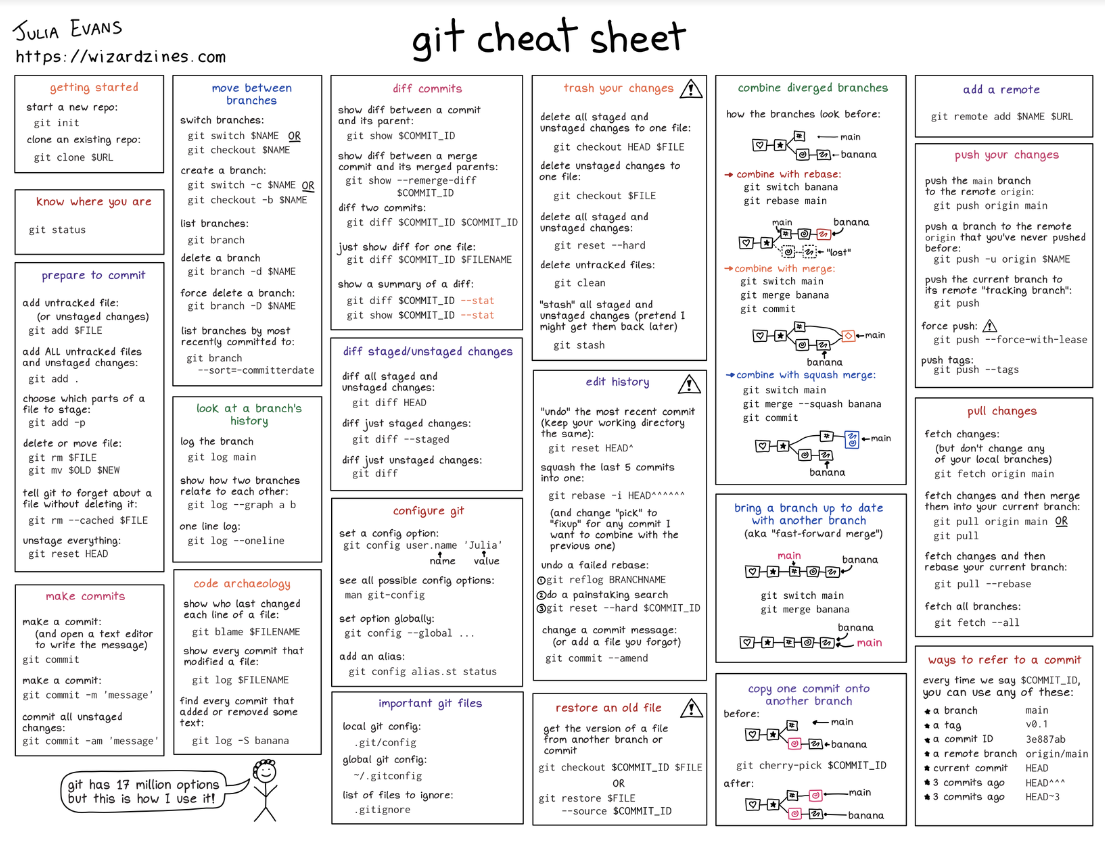
Other excellent tutorials
- Git Branching and merging
- Great one page for beginners – rogerdudler.github.io/git-guide/
- ndpsoftware.com/git-cheatsheet.html
- Try Git online – Great way to test yourself and get all the basic commands quickly
- Git Real – Full course at code school

Discover more from Ido Green
Subscribe to get the latest posts sent to your email.
 Ido Green