
There are many cases where you wish to migrate data from one location to another. In most cases, you will wish to do it over a secure channel. In this tutorial we will see what are the main steps in order to set a VPN (in this case: StrongSwan) on Google Compute Engine so you will have a server to server VPN solution between your on own server(s) located in the basement and Compute Engine.
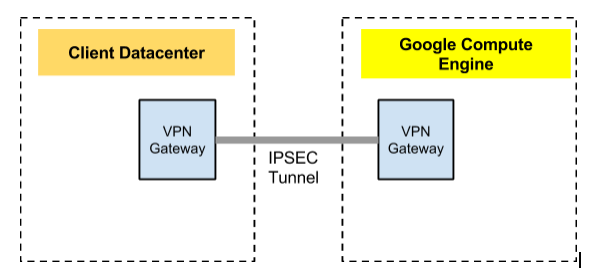
In this tutorial we will setup a VPN connection from your own datacenter to Compute Engine. First, let’s look at the big picture. We wish to have one gateway in our datacenter and another on Compute Engine. These gateways, will be responsible to connect and secure our channel so we could transfer our data over it in a secure way.
High Level Network diagram
Main steps
Pre-Setup Work
-
Set up a dedicated host at the client network.
-
Set up an external ip for the host and open port 4500 UDP
Compute Engine Work
1. Using the included management script, manageVPN.sh, you will be able to set up the gateway host and all the required advanced networking.
Edit the following parameters before executing.
| # Edit these to match your project and setup | |
| PROJECT=Your-VPN-project-name-comes-here | |
| NETWORK=main-gateway | |
| GATEWAY_NAME=vpn-gateway | |
| TEST_INSTANCE_NAME=client-1 | |
| TARGET_NETWORK="10.150.0.0/16" | |
| MACHINE_TYPE=n1-standard-1 | |
| ZONE="us-central1-a" |
2. Execute the setup script.
$ ./manageVPN.sh -p [your project] -n [your network] -i https://www.googleapis.com/compute/v1/projects/centos-cloud/global/images/centos-6-v20131120 start
Please note that you can choose other Linux images.
3. Connect to the vpn gateway.
$ gcutil --project=your-project-name ssh vpn-gateway
4. Create a file called ipsec.conf with the following contents:
| config setup | |
| # strictcrlpolicy=yes | |
| # uniqueids = no | |
| conn myconn | |
| authby=psk | |
| auto=start | |
| dpdaction=restart | |
| esp=aes128-sha1! | |
| forceencaps=yes | |
| ike=aes128-sha1-modp2048! | |
| keyexchange=ikev2 | |
| mobike=no | |
| type=tunnel | |
| left=%any | |
| leftfirewall=yes | |
| leftsubnet=10.33.0.0/16 | |
| leftauth=psk | |
| leftikeport=4500 | |
| right=108.59.85.118 | |
| rightsubnet=10.240.0.0/16 | |
| rightauth=psk | |
| rightikeport=4500 |
5. Execute the following on the host to install & configure strongSwan.
Use the ipsec.conf from above.
On CentOS 6
| sudo rpm -Uvh http://mirrors.kernel.org/fedora-epel/6/x86_64/epel-release-6-8.noarch.rpm | |
| sudo yum install -y lsof man strongswan rng-tools | |
| sudo sed -e 's/EXTRAOPTIONS=""/EXTRAOPTIONS="-r \/dev\/urandom"/' -i /etc/sysconfig/rngd | |
| sudo ln -s /usr/sbin/strongswan /usr/sbin/ipsec | |
| sudo service rngd start | |
| sudo service ipsec start | |
| sudo service strongswan start | |
| sudo chkconfig rngd on | |
| sudo chkconfig strongswan on | |
| Enable IP forwarding on the gateway (you need to do both of the following): | |
| 1.Edit /etc/sysctl.conf and uncomment the line net.ipv4.ip_forward=1. | |
| The next time the system reboots, it will load these settings. | |
| 2.For the current session, run sysctl -p to apply the changes to the running system. | |
| 6. Define a secret key for both sides. | |
| Execute the following on the host to install & configure strongSwan. | |
| Use the ipsec.conf from above. | |
| echo "%any : PSK \"<secret-key>\"" | sudo tee /etc/strongswan/ipsec.secrets > /dev/null | |
| sudo cp ipsec.conf /etc/strongswan | |
| sudo ipsec restart | |
| sudo ipsec up myconn | |
| (to set MTU size for VPN encapsulation) | |
| sudo ifconfig eth0 mtu 1300 up |
Client Network Work
I recommend a dedicated (or low utilization) box to host the strongSwan VPN server. The following setup needs to be done on that host in addition to exposing the box to the internet on port 4500.
1. Create a file called ipsec.conf with the following contents:
| config setup | |
| conn myconn | |
| authby=psk | |
| auto=start | |
| dpdaction=restart | |
| esp=aes128-sha1! | |
| forceencaps=yes | |
| ike=aes128-sha1-modp2048! | |
| keyexchange=ikev2 | |
| mobike=no | |
| type=tunnel | |
| left=%any | |
| leftfirewall=yes | |
| leftid=<< Edit with the external address of your local system >> | |
| leftsubnet=<< Edit with your local network range >> | |
| leftauth=psk | |
| leftikeport=4500 | |
| right= << Add the external ip of the remote instance >> | |
| rightsubnet=<< Edit with the remote network range >> | |
| rightauth=psk | |
| rightikeport=4500 |
2. Execute the following on the host to install & configure strongSwan.
Use the ipsec.conf from above.
CentOS 6
| sudo rpm -Uvh http://mirrors.kernel.org/fedora-epel/6/x86_64/epel-release-6-8.noarch.rpm <-- This might be changed... So check it on Fedora site | |
| sudo yum install -y lsof man strongswan rng-tools | |
| sudo vi /etc/sysconfig/rngd; EXTRAOPTIONS="-r /dev/urandom"; | |
| sudo ln -s /usr/sbin/strongswan /usr/sbin/ipsec | |
| sudo service rngd start | |
| sudo service ipsec start | |
| sudo service strongswan start | |
| sudo chkconfig rngd on | |
| sudo chkconfig strongswan on | |
| echo "%any : PSK \"<secret-key>\"" | sudo tee /etc/strongswan/ipsec.secrets > /dev/null | |
| sudo cp ipsec.conf /etc/strongswan | |
| # Enable IP forwarding on the gateway (you need to do both of the following): | |
| 1.Edit /etc/sysctl.conf and uncomment the line net.ipv4.ip_forward=1. The next time the system reboots, it will load these settings. | |
| 2.For the current session, run sysctl -p to apply the changes to the running system. |
3. Update the secret key. Execute the following on the host to install & configure strongSwan. Use the ipsec.conf from above.
| echo "%any : PSK \"<secret-key>\"" | sudo tee /etc/strongswan/ipsec.secrets > /dev/null | |
| sudo cp ipsec.conf /etc/strongswan | |
| sudo ipsec restart | |
| sudo ipsec up myconn |
4. Set up routes on the cassandra hosts to reach the remote Compute Engine network via the local gateway host.
| sudo route add -net 10.240.0.0/16 eth1 | |
| sudo route add -net 10.250.0.0/16 eth1 | |
| sudo ifconfig eth1 mtu 1300 up |
Appendix
manageVPN.sh Script
| #!/bin/sh | |
| # Edit these to match your project and setup | |
| PROJECT=vpn-lab | |
| NETWORK=gce-network | |
| GATEWAY_NAME=vpn-gateway-1 | |
| TEST_INSTANCE_NAME=povm-1 | |
| TARGET_NETWORK="10.150.0.0/16" | |
| MACHINE_TYPE=n1-standard-1 | |
| ZONE="us-central1-a" | |
| REGION="us-central1" | |
| PRESHARED_KEY="googtest" | |
| # End editable params | |
| IPSEC_TEMPLATE="ipsec.template" | |
| GCUTIL=`which gcutil` | |
| IMAGE="https://www.googleapis.com/compute/v1/projects/debian-cloud/global/images/debian-7-wheezy-v20131120" | |
| while getopts ":p:n:i:t:" opt; do | |
| case $opt in | |
| p) | |
| PROJECT=$OPTARG | |
| ;; | |
| n) | |
| NETWORK=$OPTARG | |
| ;; | |
| i) | |
| IMAGE=$OPTARG | |
| ;; | |
| t) | |
| TARGET_NETWORK=$OPTARG | |
| ;; | |
| \?) | |
| echo "Invalid option: -$OPTARG" >&2 | |
| exit 1 | |
| ;; | |
| 🙂 | |
| echo "Option -$OPTARG requires an argument." >&2 | |
| exit 1 | |
| ;; | |
| esac | |
| done | |
| PARAM=${@:$OPTIND:1} | |
| if [ -z "$PARAM" ] ; then | |
| echo $0 "[start | shutdown]" | |
| fi | |
| if [ "$PARAM" = "start" ] ; then | |
| NETWORK_DETAILS=`$GCUTIL --project=$PROJECT listnetworks | grep $NETWORK` | |
| SOURCE_NETWORK=`echo $NETWORK_DETAILS | awk -F'|' '{print $3}' | tr -d ' '` | |
| SOURCE_GATEWAY=`echo $NETWORK_DETAILS | awk -F'|' '{print $4}' | tr -d ' '` | |
| $GCUTIL --project=$PROJECT addinstance $GATEWAY_NAME --can_ip_forward=true \ | |
| --machine_type=$MACHINE_TYPE --persistent_boot_disk \ | |
| --network $NETWORK --external_ip ephemeral \ | |
| --zone $ZONE --image $IMAGE --tags vpn | |
| GATEWAY_IP=`$GCUTIL --project=$PROJECT getinstance $GATEWAY_NAME | grep ' ip' | awk -F'|' '{print $3}' | tr -d ' '` | |
| GATEWAY_EXTERNAL_IP=`gcutil --project=$PROJECT getinstance $GATEWAY_NAME | grep external-ip | awk -F'|' '{print $3}' | tr -d ' '` | |
| # Reserve the external ip | |
| $GCUTIL --project=$PROJECT reserveaddress --region=$REGION \ | |
| --source_address=$GATEWAY_EXTERNAL_IP gatewayip | |
| # TODO: Set up the gateway software | |
| # `/bin/cat install.template | sed -e 's/<secret_key>/$PRESHARED_KEY' > install.sh` | |
| # $GCUTIL --project=$PROJECT put $GATEWAY_NAME install.sh . | |
| # $GCUTIL --project=$PROJECT ssh $GATEWAY_NAME ./install.sh | |
| $GCUTIL --project=$PROJECT addinstance $TEST_INSTANCE_NAME --network $NETWORK \ | |
| --image $IMAGE --zone us-central1-a \ | |
| --machine_type=$MACHINE_TYPE --persistent_boot_disk | |
| $GCUTIL --project=$PROJECT addroute --network $NETWORK \ | |
| target-network-via-gateway $TARGET_NETWORK --next_hop_ip $GATEWAY_IP | |
| $GCUTIL --project=$PROJECT addfirewall vpn-ssh --allowed_ip_sources 0.0.0.0/0 --allowed 'tcp:22' --network $NETWORK | |
| $GCUTIL --project=$PROJECT addfirewall vpn-allow-internal --allowed_ip_sources 10.0.0.0/8 \ | |
| --allowed 'tcp:1-65535,udp:1-65535,icmp' \ | |
| --network $NETWORK --target_tags vpn | |
| $GCUTIL --project=$PROJECT addfirewall vpn-allow-ipsec-nat --allowed_ip_sources $GATEWAY_EXTERNAL_IP/32 \ | |
| --allowed 'udp:4500' --network $NETWORK --target_tags vpn | |
| $GCUTIL --project=$PROJECT addfirewall vpn-allow-all-peer --allowed_ip_sources $TARGET_NETWORK \ | |
| --allowed 'tcp:1-65535,udp:1-65535,icmp' --network $NETWORK --target_tags vpn | |
| echo "EXTERNAL GATEWAY: $GATEWAY_EXTERNAL_IP" | |
| elif [ "$PARAM" == "shutdown" ] ; then | |
| $GCUTIL --project=$PROJECT deleteinstance -f --delete_boot_pd $GATEWAY_NAME | |
| $GCUTIL --project=$PROJECT deleteinstance -f --delete_boot_pd $TEST_INSTANCE_NAME | |
| $GCUTIL --project=$PROJECT deleteroute -f target-network-via-gateway | |
| $GCUTIL --project=$PROJECT deletefirewall -f vpn-ssh | |
| $GCUTIL --project=$PROJECT deletefirewall -f vpn-allow-internal | |
| $GCUTIL --project=$PROJECT deletefirewall -f vpn-allow-ipsec-nat | |
| $GCUTIL --project=$PROJECT deletefirewall -f vpn-allow-all-peer | |
| $GCUTIL --project=$PROJECT releaseaddress --region=$REGION gatewayip --force | |
| else | |
| echo $0 "[start | shutdown ]" | |
| fi |
Misc
-
The online documentation for Compute Engine.
- StrongSwan documentation.
Happy hacking.
Discover more from Ido Green
Subscribe to get the latest posts sent to your email.
 Ido Green