
 A few commands I found myself using daily… Well, it might be a good idea to share it with others and see what can be done better. If you like to get out of the command line, I found Source Tree to be a powerful free application that give you many options to see the code, changes and flow. You might want to check it out. Another good option is the GitHub official client app. Ok, let’s jump into the list of git commands.
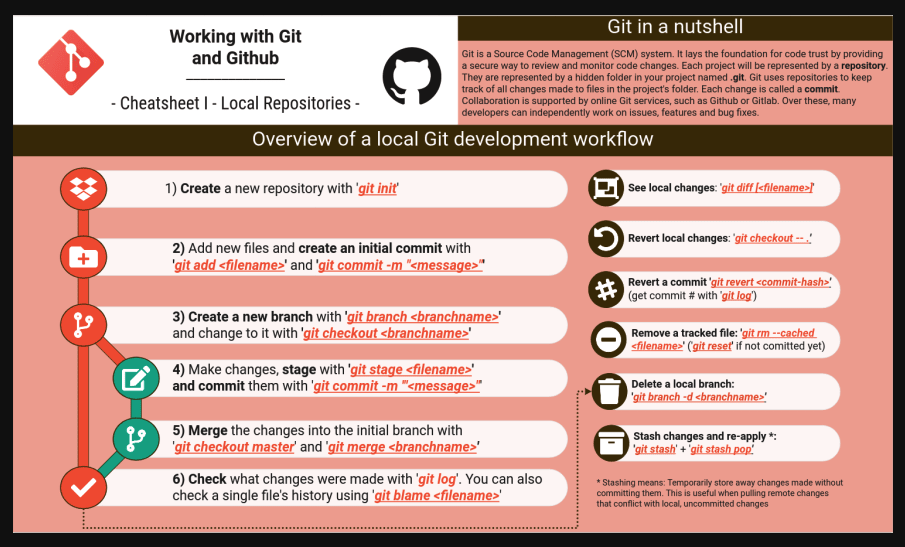
The path from ‘local’ to ‘remote’
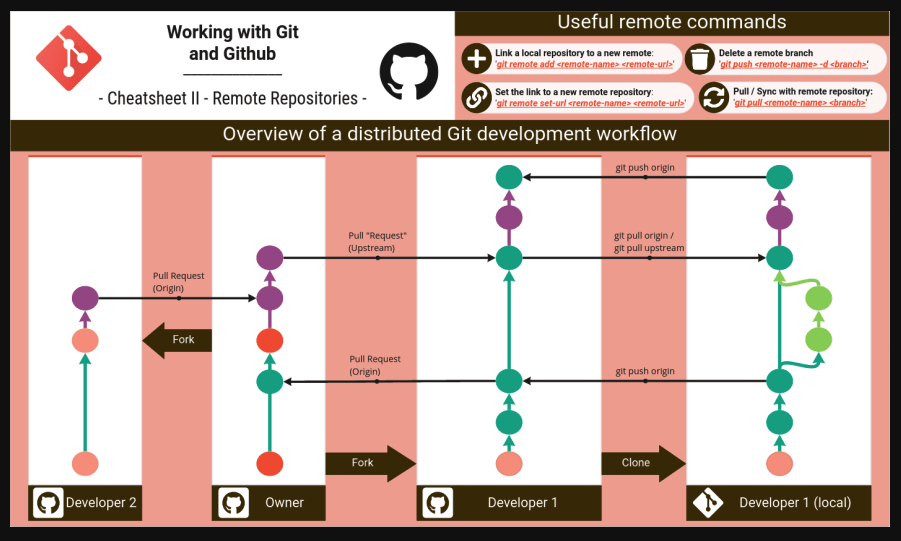
Init and Settings
Few aliases to type less and do more:
- gb = git branch
- gc = git commit -v
- gd = git diff | <your-fav-diff-app>
- gl = git pull
- gp = git push
- gstat = git status
Start git on your project
git init
Next, add an empty .gitignore in the empty directory:
touch log/.gitignore
later, you can put in this files all the ‘meta’ files (e.g. logs, libs, tmp dir, conf etc’) that you don’t wish to put to the repository.
Set the addition of all files to the next commit
git add .
Btw, to undo git add . –> use git reset
Checking the status of your repository
git status
This is useful at any point to understand where you are standing with git.
Committing Changes
git commit -m "initial version of this wonderful project"
Seeing what files have been committed
git ls-files
Committing all changes in a repository
git commit -a
Scheduling the addition of an individual file to the next commit
git add [file name]
Viewing the difference as you commit
git commit -v
Commit and type the message on the command line
git commit -m "This should be a long-detailed message that describing the commit changes so next time you (or others) will be able to tell what is going on without opening the files and going on each and every line that was changed"
Scheduling deletion of a file
git rm [file name]
Commit and automatically get any other changes
git commit -a
A “normal” commit command
git commit -a -v
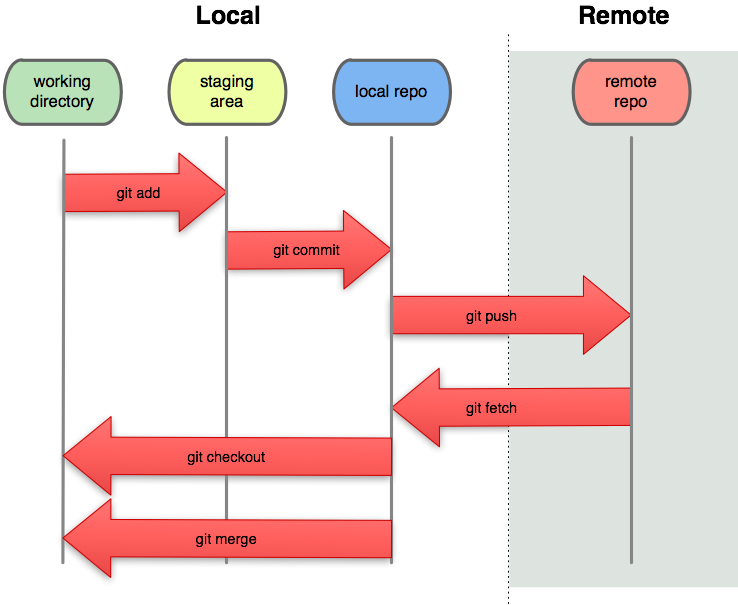
Git flow diagram
Checking what is going here
View your configuration
cat .gitconfig
Viewing a log of your commits
git log
Viewing a log of your commits with a graph to show the changes
git log --stat
Viewing a log with pagination
git log -v
Visualizing git changes
gitk --all
Creating a new tag and pushing it to the remote branch
git tag "v1.3"git push --tags
Branching Magic
Creating a new branch
git branch [name of your new branch]
Pushing the branch to a remote repository
git push origin [new-remote]
Pulling a new branch from a remote repository
git fetch origin [remote-branch]:[new-local-branch]
Viewing branches
git branch
Viewing a list of all existing branches
git branch -a
Switching to another branch
The state of your file system will change after executing this command.
git checkout [name of the branch you want to switch to]
Making sure changes on master appear in your branch
git rebase master
Merging a branch back into the master branch
First, switch back to the master branch:
git co master
Check to see what changes you’re about to merge together, compare the two branches:
git diff master xyz
If you’re in a branch that’s not the xyz branch and want to merge the xyz branch into it:
git merge xyz
Reverting changes to before merging it
git reset --hard ORIG_HEAD
That is all for now.
Check out the advance git post if you wish to dive deeper.
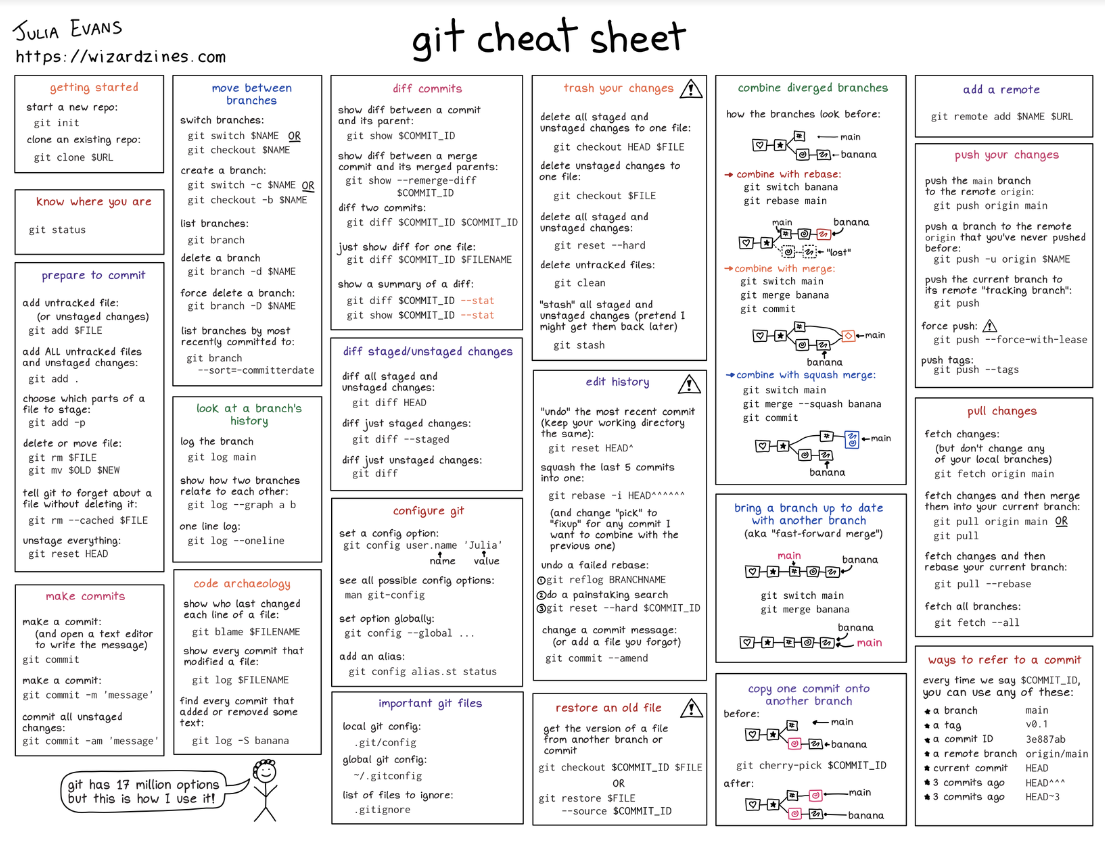
The great Julia Evans did this helpful cheat sheet:
Discover more from Ido Green
Subscribe to get the latest posts sent to your email.
 Ido Green
Thank you for sharing this extensive list of Git Commands. I find them very useful since they save time especially when you have to type all those commands. I also like your blog and couldn’t help but follow it! I look forward to other great posts.
Thank you!
Reblogged this on Sutoprise Avenue, A SutoCom Source.
this is actually on my bookmarks bar by now 🙂
Very helpful…thanks!!!
I am not certain where you’re obtaining your data, although excellent subject. Need to spend a little while discovering a lot more or hitting the gym extra. We appreciate you spectacular details I’d been seeking this info in my mission.