
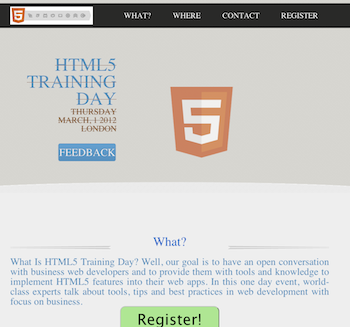
 On the second day of the JPR12 we had a good coding dojo (which is a meeting where a bunch of coders get together to work on a programming challenge) during the afternoon activities on Google App Script. The idea was to create a simple, yet functional, system to organize an event. The event could be a training day, hackathon, birthday party, running race, etc’. We started with a template site I’ve created that is built on top of twitter bootstrap-responsive and modernizr (but of course).
The site gives you basic functions like:
- What – What is the event goal/mission or why should I come.
- Where – Information on the venue and where to park. We use some nice custom google map in order to follow the rule: “one picture is worth 10,000 words”.
- Contact – Who is running the event and ways to get in touch.
- Registration – Using Google forms and app script, as our backend, we will have a system to keep track on the registration process.
- Set up the maximum number of people that could participate in this event.
- Send a confirmation email.
- Send a waiting-list email to the ones that are filling the registration form after the maximum number of participate is being reach.
- Send a reminder email (a week and/or a day) before the event.
- Lastly, after the event, send an email with a link to a feedback form. We want to be able to improve…
- Simple one page app that will render nicely on phones, tablets and desktops.
- Backend that let us run the communication with the participates and keep tracks on the registration process.
//
// Call this when you want to send the call
// for Feedback email AFTER the event is done
//
function sendFeedbackEmail() {
  // Get our main spread sheet into ss obj.
  var ss = SpreadsheetApp.getActiveSpreadsheet();

  // Fetch the sheet with the list of emails
  var dataSheet = ss.getSheetByName("Registration");

  // Fetch the range the contain our information for the email
  var dataRange = dataSheet.getRange(2, 2,
      dataSheet.getMaxRows() - 1,
      NUM_FORM_QUESTIONS + 1);

  // First row of data to process
  var startRow  = 2;

  // Get the email template (you may use html template here)
  var templateSheet = ss.getSheetByName("Email Templates");
  var emailTemplate = templateSheet.getRange("A5").getValue();

  // Create one JavaScript object per row of data.
  objects = getRowsData(dataSheet, dataRange);

  // For every row object, create a personalized email from a template and send
  // it to the appropriate person.
  for (var i = 0; i < objects.length; ++i) {

    // Get a row object
    var rowData = objects[i];

    // Only contact people who are 'yes' status
    if (rowData.status == YES) {

      // Generate a personalized email.
      // Given a template string, replace markers (for instance ${"First Name"}) with
      // the corresponding value in a row object (for instance rowData.firstName).
      var emailText = fillInTemplateFromObject(emailTemplate, rowData);
      var emailSubject = dataSheet.getRange("P2").getValue() + " Reminder";

      MailApp.sendEmail(rowData.emailAddress, emailSubject, emailText);

      // Make sure the cell is updated right away in case the script is interrupted
      SpreadsheetApp.flush();
    }
  }
}
Here is the full code for the event site: https://github.com/greenido/events-site-template please feel free to fork, pull and do something cool with it. For more details on the new options and capabilities in Google App Script: https://developers.google.com/apps-script/templates
Discover more from Ido Green
Subscribe to get the latest posts sent to your email.
 Ido Green