
Quick Intro
If you wish to read the first part of this series please go to Web Workers Part 1.
The Web Workers specification defines an API for spawning background scripts in your web application. Web Workers allow you to do things like fire up long-running scripts to handle computationally intensive tasks, but without blocking the UI or other scripts to handle user interactions. They’re going to help put and end to that nasty ‘unresponsive script’ dialog that we’ve all come to love:
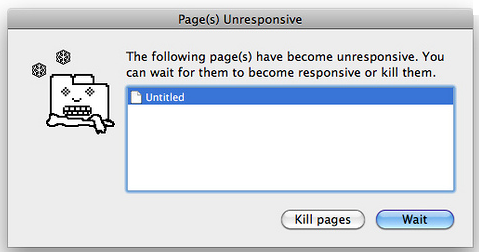
or if you are (still) on windows:

Workers utilize thread-like message passing to achieve parallelism. They’re perfect for keeping your UI refresh, performant, and responsive for users.
Types of Web Workers And Some Code
It’s worth noting that the specification discusses two kinds of Web Workers:
- Dedicated Workers – here is the code of an example I’ve created to show you how to post messages in order to control the worker and get some prime numbers on the way. If you wish to see a live example: web workers & prime & messages
- Shared Workers – This will be covered in Part 3 of this series.
Restrictions with Local Access
Due to Google Chrome’s security restrictions, workers will not run locally (e.g. from file://) in the latest versions of the browser. Instead, they fail silently! To run your app from the file:// scheme, run Chrome with the --allow-file-access-from-files flag set. It is not recommended to run your primary browser with this flag set. It should only be used for testing purposes and not regular browsing.
(!) Debug: The other good thing to know is that you can debug works in the Chrome Developer Tools by clicking on the Scripts tab, and scrolling down in the column on the right to Workers and clicking on the debug checkbox.
Other browsers do not impose the same restriction.
Same Origin Considerations
Worker scripts must be external files with the same scheme as their calling page. Thus, you cannot load a script from a data: URL or javascript: URL, and an https: page cannot start worker scripts that begin with http: URLs.
The Code
<!DOCTYPE HTML>
<html>
  <head>
    <title>Web Worker: The highest prime number</title>
    <script src="http://ajax.googleapis.com/ajax/libs/jquery/1/jquery.min.js"></script>
    <meta charset=utf-8 />
  </head>
  <style>
    #actions {
      position: fixed;
      top: 10px;
      background: lightBlue;
      padding:8px;
    }
    h1 {
      position: relative;
      bottom: 10px;
      left: 280px;
    }
    #status {
      position: relative;
      font-size: 120%;
      background: lightyellow;
      margin:8px;
    }
    article {
      position: relative;
      color:red;
    }
    input {
      width: 80px;
      height: 35px;
      font-size: 120%;
    }
  </style>
  <body>
    <script>
      var myWorker;

      function start() {
        console.log("WebWorker: Starting");
        myWorker = new Worker("highPrime2.js");
        myWorker.addEventListener("message", primeHandler, false);
        var maxNum = $('#upto').val();
        myWorker.postMessage({'cmd': 'start', 'upto': maxNum});
      }

      function stop() {
        if (myWorker != undefined) {
          var msg = "<br/>WebWorker: Terminating " + new Date();
          console.log(msg);
          $('#status').append(msg);
          myWorker.terminate();
          myWorker = null;
        }
      }
      function primeHandler(event) {
        console.log ('got e:'+event.data);
        if (is_numeric(event.data)) {
          $('#result').append(event.data);
        }
        else {
          $('#status').append(JSON.stringify(event.data) );
        }
      }

      function is_numeric(input){
        return typeof(input)=='number';
      }
    </script>

    <h1>Web Worker: The highest prime number</h1>
    <article>The prime numbers:
      <output id="result"></output>
      <div id="status"></div>
    </article>
    <div id="actions">
      <input type="text" name="upto" id='upto'/>
      <button onclick="start()" title="Start the work">Start</button>
      <button onclick="stop()" title="Stop the work and go have a drink">Stop</button>
    </div>
  </body>
</html>

// And here is the worker code:
<script>
  //
  // A simple way to find prime numbers
  //
  self.addEventListener('message', function(e) {
    var data = e.data;
    var shouldRun = true;

    switch (data.cmd) {
      case 'stop':
        postMessage('Worker stopped the prime calculation (Al Gore is happy now) ' +
          data.msg );
        shouldRun = false;
        self.close(); // Terminates the worker.
        break;
      case 'start':
        postMessage("Worker start working upto: " + data.upto + " (" + new Date()+ ")<br/>");
        var numbers = isPrime(data.upto);
        postMessage("Got back these numbers: "+ numbers + "<br/>");
        break;
      default:
        postMessage('Dude, unknown cmd: ' + data.msg);
    };
  }, false);

  // simple calculation of primes (not the most efficiate - but works)
  function isPrime(number) {
    var numArray = "";
    var this_number,divisor,not_prime;
    var this_number = 3;
    while(this_number < number) {
      var divisor = parseInt( this_number / 2);
      var not_prime = 0;
      while(divisor > 1) {
        if(this_number % divisor == 0) {
          not_prime = 1;
          divisor = 0;
        }
        else {
          divisor = divisor - 1;
        }
      }
      if(not_prime == 0) {
        numArray += (this_number + " ");
      }
      this_number = this_number + 1;
    }
    return numArray;
  }
</script>
The last part of this series is about Shared Web Workers.
You can also find full set of example on github: Web Workers Examples.
Discover more from Ido Green
Subscribe to get the latest posts sent to your email.
 Ido Green
hey, can we use web workers to request to server using ajax?
so it will executed in background and then user can see or access other page but after request has finished user get notification from worker
?
sory for bad english 😀
nice tutorial btw,